Scale Gizmo
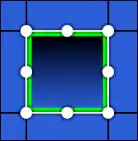
The scale gizmo is used for scaling objects quickly. Dragging the dots around the perimeter will scale the selected objects.
Controls
Holding Ctrl will snap the scale factor to the nearest 0.5.
Holding Alt will scale the selection anchored at the center instead of at the opposite end of the dot.
Quick Mode
In quick mode, the scale is based off of the distance of the cursor to its position when the gizmo was activated.
Axis Constraining
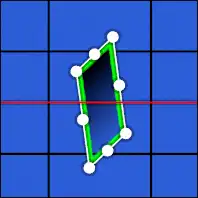
Pressing X or Y toggles between different constraint modes:
- Aligned to local axis
- Aligned to global axis
- Disabled
Scaling aligned to a local axis with rotated objects selected is currently the only way to skew objects.
Quick Input
While the axis is constrained, the objects will be scaled along the locked axis based on the quick input value. If no axis is constrained, the quick input value will show the scale factor.