Rotate Gizmo
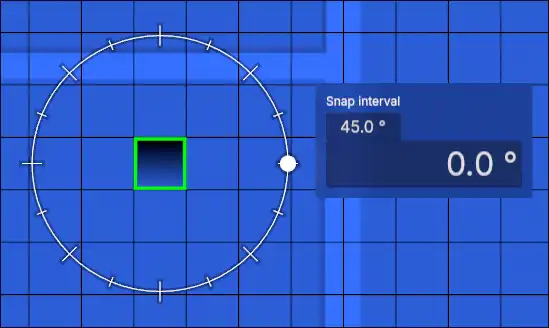
The rotate gizmo is used for rotating objects quickly. Dragging the dot around the circle will rotate the selected objects.
Input Panel
Snap Interval
Changes the gap between the big ticks. The value is automatically rounded to the nearest factor of 360 to prevent a smaller angle at the end of the circle.
Angle
Changes the angle of rotation relative to the starting rotation.
Quick Mode
In quick mode, the rotation is constrained to the mouse, there is no input panel, and there is no snapping by default.
While Ctrl is held, rotation will be snapped to the nearest 22.5°. The snap interval cannot be adjusted.
Quick Input
The objects are rotated based on the quick input value if there is one; otherwise, the rotation will be displayed.